
EMPLOYEE DISCOUNTS 2026
Perks at Work vs TicketsatWork
Last verified: October 10, 2026. The next useful deal may already be included in your workplace benefits. Many U.S. employers offer optional shopping, movie, travel and attraction discounts through providers such as TicketsatWork and Perks at Work. But these are not public coupon websites that everyone can join. Access usually depends on a participating employer or qualifying organization.
This independent guide shows what to ask HR, how company verification works, how to compare the final price, and why loyalty points are not the same as instant cash off.
Quick comparison: TicketsatWork vs Perks at Work
| Question | TicketsatWork | Perks at Work |
|---|---|---|
| Who gets access? | Employees or eligible members whose employer or organization participates | Employees of participating partner employers or other authorized organizations |
| How to start | Employer-provided company code or work email on the platform’s approved sign-up flow | Ask HR or the benefits team; register with required employer details or company credentials |
| Types of benefits | Tickets to entertainment, hotels, select shopping and lifestyle offers; availability depends on employer | Retail, travel, in-store and other offers; WOWPoints on qualifying purchases |
| Rewards currency | Some offers display FunLife Rewards; redemption terms depend on the program | WOWPoints may be earned and redeemed subject to merchant and account rules |
| Caution | Verify fees, terms, ticket delivery and the merchant before paying | Check that the purchase uses the required tracked link and that other coupon codes do not disqualify the reward |
1. Find out which platform your employer actually offers
Start with your employer’s benefits intranet, HR help desk, employee handbook or workplace benefits app. A company may offer TicketsatWork, Perks at Work, neither, or something else. The provider you want to use must be confirmed by your employer. Perks at Work’s official help center says ordinary personal accounts without a connected employer are not currently available.
- Search the internal benefits portal for ’employee discounts,’ ‘perks,’ ‘tickets’ and ‘voluntary benefits.’
- Ask whether eligibility includes full-time, part-time, contractor, retired or family members; do not assume all groups qualify.
- Request the official provider name and website URL from HR.
- Ask whether registration requires a work email, employee ID or company code.
- Only submit identifying information through a verified official employer or provider link.

2. TicketsatWork: employee tickets, travel and shopping
TicketsatWork describes itself as a corporate employee discounts program. Its official employer page states that once a company enrolls, employees can register with a work email or company code to access available deals. The advertised categories include attractions, entertainment, travel and everyday shopping. Individual inventory, ticket fees and employer-sponsored benefits vary.
The official TicketsatWork employer page is designed to explain its benefits to organizations. For employees, the sign-in starts at TicketsatWork’s official homepage. The program does not guarantee that every listed attraction, hotel or product is cheaper than another seller.
- Check which products are actually accessible in your employer-linked account.
- For theme-park or event admission, confirm exact date, venue, age classification, taxes, service fees and delivery method.
- For hotel rates, compare the same room type and total payable cost against hotel-direct member pricing.
- For a retail item, verify authorized seller, warranty and return policy.
- Keep order confirmation and account-support information for any refund or entry issue.
3. Perks at Work: understand WOWPoints
Perks at Work says access depends on a partner employer and may require a company email, company code or other employer information. The program offers a points system named WOWPoints. Its current official help center explains that one WOWPoint is generally worth one cent when redeemed, with exceptions for special promotions.
For example, an offer that awards 20 WOWPoints per dollar could generate 400 points for a $20 eligible purchase. At the standard one-cent point value, 400 points would represent $4 in potential future redemption value—not a guaranteed $4 immediate discount. The promotion and merchant conditions determine whether the points are earned. This calculation uses the program’s example structure; it is not a current store promotion.
The help center warns that you may need to click the program’s Shop Now link immediately before buying, that applying external coupons or promotional links can disqualify points, and that tracked points may take seven to ten business days to appear. Official WOWPoints earning guide.
4. Reward points versus instant discounts: a fair price comparison
| Illustrative option | Your payment today | Future points or credit | How to decide |
|---|---|---|---|
| Public retailer | $140 | None assumed | Compare $140 total with warranty and returns |
| Employee portal offer A | $145 | Potential future points worth $10 under conditions | Higher cash payment now; points require future eligible use |
| Employee portal offer B | $132 | None assumed | May be cheaper immediately, subject to matching product and fees |
All figures above are invented examples. If the employee offer charges more upfront but awards points later, decide whether you can actually use those points. Compare equivalent models, fees, warranty, delivery and cancellation terms, not just marketing badges.
5. What happens to WOWPoints if you leave your employer?
Perks at Work’s current help articles state that WOWPoints do not expire and can remain available after employment changes. If you lose access to a company email, the help center describes a support process to move an account to a personal email address or merge accounts when switching to another participating employer. This is not permission to continue using all future employer-only discounts after leaving; eligibility for new deals must still be verified.
- For points issues, read the official WOWPoints balance help.
- For employment transitions, read the official account-transition instructions.
- Contact verified Perks at Work support through the official site; do not hand your former employee ID or credentials to strangers.
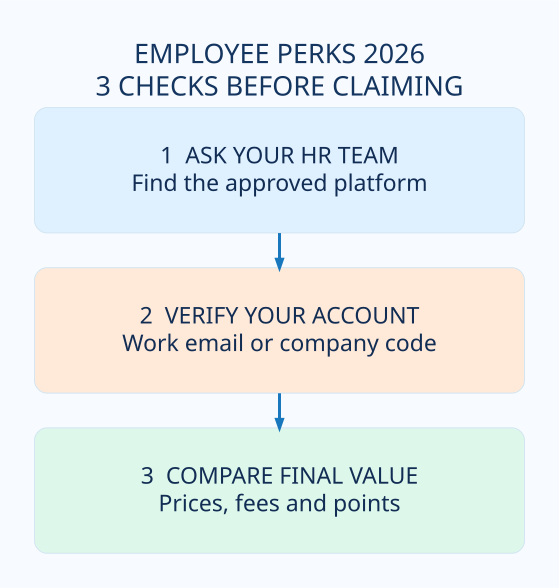
6. Seven smart checks before claiming a workplace perk
- Confirm you are eligible through your current employer or benefits administrator.
- Use the approved platform URL and never share a company code publicly.
- Compare the same trip, ticket or exact product sold through other trusted channels.
- Check all taxes, service charges, shipping and fees before paying.
- Review refund rules, transfer rules and expiration dates on tickets or vouchers.
- If earning points, check tracking requirements, posting delays and restrictions on outside coupons.
- Save your confirmation and contact the actual provider—not an unrelated coupon page—for order issues.
7. When to look for annual employee perks
Employee discount portals may announce new theme-park, holiday-shopping, hotel, back-to-school and travel deals throughout the year. There is no universal employee bonus calendar or guaranteed annual percentage. Follow verified announcements in your employer portal or its official member newsletter rather than relying on screenshots from last year.
Frequently asked questions
Can anyone register for these programs?
No. Access depends on an eligible participating employer or organization and the provider’s required verification. If your employer does not participate, ask HR which alternative benefits are available.
Is a company discount the same as a cash bonus from my employer?
No. A shopping discount, points reward, employer recognition gift and payroll bonus are different types of value with different eligibility and terms.
Can my family use my employee discount?
Some programs allow the employee to buy eligible tickets or experiences for family and friends, but the purchase must follow the program’s account and ticket restrictions. Check each offer rather than sharing login credentials.
Can I use WOWPoints like cash anywhere?
No. WOWPoints can be redeemed through permitted offers and program methods. The standard point value does not turn them into unrestricted bank-account cash.
Related money-saving guides
Planning a trip with your corporate benefit? Compare Hilton Honors and Marriott Bonvoy direct-book rates before paying. Shopping for electronics? Compare official student education pricing where eligible. For annual events, browse our U.S. Deals Calendar.
Primary sources reviewed
- TicketsatWork employer program and verification overview
- TicketsatWork employee entry page
- TicketsatWork employer enrollment guide
- Perks at Work: Eligibility and registration
- Perks at Work: Earning WOWPoints
- Perks at Work: WOWPoints use and standard value
- Perks at Work: Account access after employment change
Editorial independence: Happy Perks Calendar is not affiliated with these employee benefit platforms or any named employer. This is a comparison guide, not a benefits enrollment service. Actual access, offer price, point value and validity may vary. Verify with HR or the official provider before making a purchase.
Share this guide
Know someone who could use these official-source checks? Share the link. Terms and availability may change.

